
Download Snipcast – AI‑Powered Podcast & Video Summaries
Overview
Snipcast is a web‑based AI tool designed to turn lengthy podcasts and videos into concise, readable summaries that land straight in your inbox. Whether you’re juggling a busy schedule, studying for an exam, or simply want to stay informed without committing hours to listening, Snipcast extracts the core ideas, key arguments, and memorable quotes from content hosted on popular platforms such as YouTube, Spotify, and Apple Podcasts. The service works entirely online, so there’s no bulky software to install—just a modern browser and an internet connection.
Users paste a URL, select a preferred summary length, and receive a polished text version within minutes. A free tier provides a limited number of summaries per month, while a subscription unlocks higher‑volume usage, the ability to upload private audio or video files, and priority processing. By delivering bite‑sized knowledge directly to your email, Snipcast integrates seamlessly with existing content‑consumption habits, making learning more efficient and retention higher.
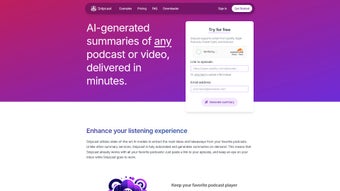
The interface is intentionally minimalist: a single input field, a clear “Generate Summary” button, and a progress indicator that keeps you informed of the AI’s work. For professionals, students, or lifelong learners, Snipcast offers a secure, privacy‑first environment—only publicly available content is processed unless you explicitly upload personal files, and no data is sold to third parties. In short, Snipcast combines cutting‑edge natural‑language processing with a user‑friendly web experience to help you get the most out of audio and video media without the time sink.
Key Features & Benefits
- AI‑driven summarization that captures main ideas, supporting arguments, and notable quotes.
- Supports URLs from YouTube, Spotify, Apple Podcasts, and other major streaming services.
- Option to upload personal audio or video files for private summarization (premium only).
- Automatic email delivery of summaries, keeping your inbox organized and searchable.
- Adjustable summary length – choose concise bullet points or detailed paragraph form.
- Free tier provides up to 5 summaries per month; paid plans offer unlimited usage.
- Secure processing – no data is stored longer than necessary, and privacy policies are transparent.
- Cross‑platform accessibility – works on any modern browser, from desktop to mobile.
- Multi‑language support for English and selected additional languages (future roadmap).
- Integration‑ready API (in development) for businesses that want to embed summarization into their own tools.
These features translate into real‑world benefits for a broad audience. Students can skim lecture recordings to identify study points, while busy executives can quickly understand industry podcasts without listening to each episode in full. Content creators can repurpose summaries for blog posts or social media snippets, boosting SEO and audience engagement.
Because the service delivers summaries via email, you can archive them, tag them, or feed them into note‑taking apps like Notion or Evernote, creating a personal knowledge base without manual transcription. The premium option’s ability to handle private files also makes Snipcast a valuable asset for teams that need to distill internal webinars, meeting recordings, or training videos while keeping sensitive information confidential. Overall, Snipcast’s feature set is built around the principle of “less time, more insight,” turning hours of audio into minutes of actionable information.
Installation, Usage & Compatibility
Getting Started – No Download Required
Since Snipcast is a cloud‑based service, there is nothing to download or install on your device. Simply navigate to snipcast.com using a current version of Chrome, Firefox, Safari, or Edge. The site automatically detects your browser’s capabilities and serves a responsive layout optimized for both desktop monitors and mobile screens.
Step‑by‑Step Workflow
- Paste the URL of the podcast episode or YouTube video you want summarized into the input field.
- Select summary length – choose “Brief” (3‑5 bullet points), “Standard” (one paragraph), or “Detailed” (multiple paragraphs).
- Enter your email address where you’d like the summary delivered.
- Click the Generate Summary button. The AI begins processing the audio, transcribing it, and extracting key concepts.
- Within 2‑5 minutes (depending on content length and server load), you receive a formatted summary in your inbox.
Premium users have an additional step: they can click “Upload File” to drag‑and‑drop a private MP3, MP4, or WAV file, then follow the same workflow. The uploaded file is encrypted during transit and deleted after summarization.
Operating System Support
Because Snipcast runs entirely in the browser, it is compatible with any operating system that can run a modern web browser. This includes:
- Windows 10, 11 and later
- macOS Ventura, Monterey, and earlier versions with up‑to‑date browsers
- Linux distributions (Ubuntu, Fedora, etc.)
- Android 8.0+ (Chrome or Firefox mobile)
- iOS 13+ (Safari or Chrome)
There are no additional system requirements such as specific CPU speed or RAM, making Snipcast a truly universal tool for anyone who consumes audio or video content.
Pros, Cons, Frequently Asked Questions & Final Verdict
Pros
- Fast, AI‑driven summaries save hours of listening.
- Web‑based – no installation, works on all devices.
- Secure handling of private uploads (premium).
- Flexible summary lengths to match different needs.
- Free tier available for casual users.
Cons
- Free plan limits the number of monthly summaries.
- Accuracy depends on audio quality; very noisy recordings may produce less precise summaries.
- Advanced features (API, multi‑language support) are still in development.
FAQ – Your Questions Answered
-
How does Snipcast handle copyrighted content?
Snipcast only processes publicly available podcasts and videos. For private uploads, the content is encrypted and deleted after summarization, ensuring compliance with copyright rules.
-
Can I use Snipcast on my smartphone?
Yes. The platform is fully responsive and works on Android and iOS browsers, allowing you to generate summaries on the go.
-
What is the typical turnaround time for a summary?
Most summaries are delivered within 2‑5 minutes, depending on the length of the source audio and current server load.
-
Is there a limit to the length of audio I can upload?
Premium users can upload files up to 2 GB, which typically covers up to 2‑3 hours of high‑quality audio.
-
How secure is my data?
All data transfers are encrypted via HTTPS. Uploaded private files are stored temporarily, processed, and then permanently deleted.
Conclusion – Why You Should Try Snipcast Today
In an age where knowledge is abundant but time is scarce, Snipcast offers a practical solution for anyone who wants to stay informed without drowning in endless audio streams. Its AI engine delivers clear, accurate summaries that capture the essence of podcasts and videos, while the email delivery system keeps your learning organized and searchable. Whether you’re a student needing quick lecture recaps, a professional seeking industry insights, or a content creator looking to repurpose audio, Snipcast’s free tier lets you test the concept with no commitment.
Upgrading to the premium plan unlocks higher volume limits, private file handling, and priority processing—features that make the service indispensable for power users. The web‑based nature means no installation headaches, and the broad compatibility ensures you can access it from any device. If you’re ready to turn hours of listening into minutes of insight, click the button below, create a free account, and start receiving smarter summaries today.
Get Started with Snipcast – Free Account
Snipcast impresses with its speed, accuracy, and ease of use. The free tier is generous enough for casual listeners, while the premium plan adds powerful features for heavy users. Minor drawbacks include the monthly limit on the free plan and occasional transcription hiccups on noisy recordings, but overall it’s a solid addition to any knowledge‑seeker’s toolkit.



.png)



